
Check before installing
Items that are not finished by updating the software alone.
- 0.1.0.7 English UI and 23 English HTML manuals
The default display language changes to English — select Korean in Settings and restart.
- 0.1.0.7 Agilebot multi-pick, PC jog and script editor
Agilebot sites need a BAS program update — see the editor template or contact your engineer.
Version history
Click a row to open the details.
0.1.0.7
2026-07-31Language English UI and 23 English HTML manuals Action
Every screen and all 23 HTML manuals are now available in English. Log files are still written in Korean regardless of the UI language, so field reports stay compatible.
Action — The default display language changes to English — select Korean in Settings and restart.
Robot Agilebot multi-pick, PC jog and script editor Action
Up to 6 picks found in a single capture are sent at once. PC-screen jogging and a script editor are included. The handshake values exchanged with the robot have also changed (count 0 = wait, 1–6 = number of picks, negative = final NG).
Action — Agilebot sites need a BAS program update — see the editor template or contact your engineer.
Details — Agilebot dedicated integration (2026-09-01)0.1.0.6
Date not publishedRobot Tool calibration by circle fitting
Rotate the robot about one fixed point and the tool centre is computed automatically. Point, centre and radius deviations are plotted in ±mm.
Robot Capture the robot's current position
Fill the table with the robot's current coordinates at the press of a button. Hyundai Robotics, Agilebot and IAI.
0.1.0.5
Date not publishedRobot Hi6 Modbus start, stop, pause and resume
Operate a Hyundai Robotics Hi6 from the screen. No more walking over to the teach pendant to start or stop.
Details — Hyundai Robotics dedicated integration (2026-08-18)0.1.0.2 · 0.1.0.4
Date not publishedThe source article listed both versions together; which item belongs to which version has not been published.
Vision Batch re-inspection of the scene gallery
Re-inspects every saved scene with the current settings and groups the results into picked, not picked and undecided. False picks and misses are highlighted with badges.
Vision Teach undecided candidates on the spot
Confirm an undecided candidate in the zoomed view and it goes straight into training.
Vision 0.5° angle steps and no candidate cap
Angle search is refined to 0.5° steps and the cap on candidate count is removed — scenes with more than 20 parts were previously dropped entirely. Search plus classification on a 2592×1944 image takes about 0.5 s (excluding capture and transfer).
0.1.0.3
Date not publishedReliability Atomic saving of recipes and settings
Recipes and settings files are written atomically. A forced shutdown or power loss during a save no longer corrupts the file.
Details — Even if power fails mid-save (2026-09-29)Reliability Last-good copy kept, automatic recovery on corruption
Every save keeps the previous good copy; if corruption is detected, the damaged file is quarantined and the last-good copy restored.
Reliability Daily snapshots, latest 30 kept
Once a day at app start-up the whole recipe set is archived as a compressed snapshot, keeping the most recent 30. The restore procedure is in the help manual.
0.1.0.1
2026-07-08 First releaseControl·PLC Three control channels — IO, TCP and Modbus
Choose how the upstream PLC connects: hard-wired DIO, TCP socket or Modbus TCP slave. All three channels share the same execution core, so switching the connection later leaves line behaviour unchanged.
Details — Three control channels (2026-09-29)Control·PLC Modbus TCP slave
Trigger, OK, NG, hopper and feeder signals are exposed as coils for up to 4 cameras and 4 feeders. Recipe changes are two-step and accepted only in the ready state; if communication drops, the command coils are cleared.
Control·PLC Communication log window — no packet analyser needed
The command channel and the data channel scroll side by side with timestamps, and each coordinate string carries its processing state such as waiting or unacknowledged. No external packet-analysis tool is required.
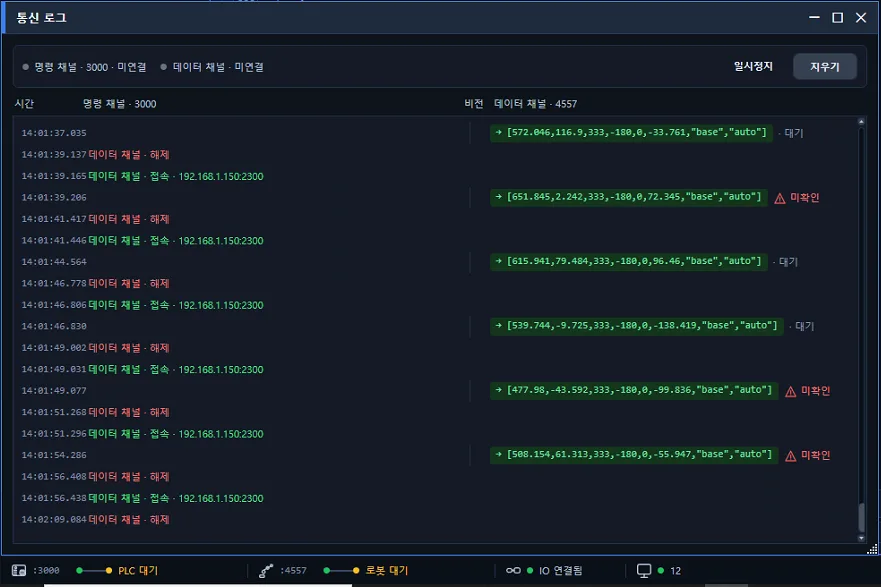 Details — Communication log window (2026-09-29)
 Robot Change the recipe and the robot changes first (Hyundai Robotics)
The robot program is written to the controller first, and the vision recipe is applied only after verification succeeds. On failure the previous recipe is kept and an alarm is raised. The check is repeated at boot and on START.
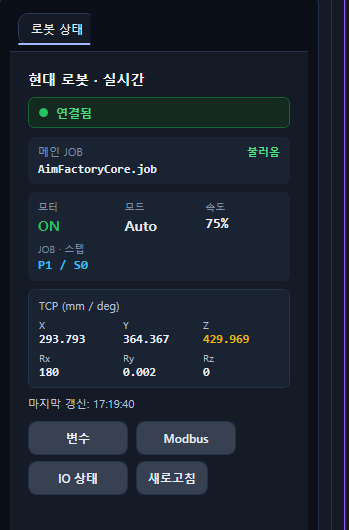 Details — Change the recipe, the robot changes first (2026-09-29)
 Sources July release round-up (2026-08-04) Agilebot dedicated integration (2026-09-01) Hyundai Robotics dedicated integration (2026-08-18)
Changes without a published version
Moved into the list above once the version is confirmed.
Vision Part height compensation
Enter the part height and coordinates are recalculated against the working distance. Parts at the edge of the pick area are picked with the same precision, without stacking a calibration data set per height. The height is saved in the recipe.
Details — Part height compensation (2026-09-03)Reliability Separate build for CPUs without AVX2
The app exited immediately on older CPUs; a dedicated build now resolves this.
Installation and delivery
- Installation files are delivered through your AIM engineer.
- If the app is running during installation, it is closed automatically and the install proceeds.
- Older CPUs without AVX2 use the dedicated build.