When the robot fails to pick a part, the first job is to tell whether the cause is the vision, the communication, or the robot. But the values passing between vision and robot are invisible.
If you cannot see the values, you cannot isolate the cause
The vision says it sent the coordinates; the robot says it never received them. Both can be right. It may have been sent in a different format, or received without the acknowledgement coming back.
This check used to be done with an external packet analyzer or a separate test tool. Launch the tool, capture the port, reproduce the problem again. During commissioning, the line stands still the whole time.
The values exchanged stay right where they were
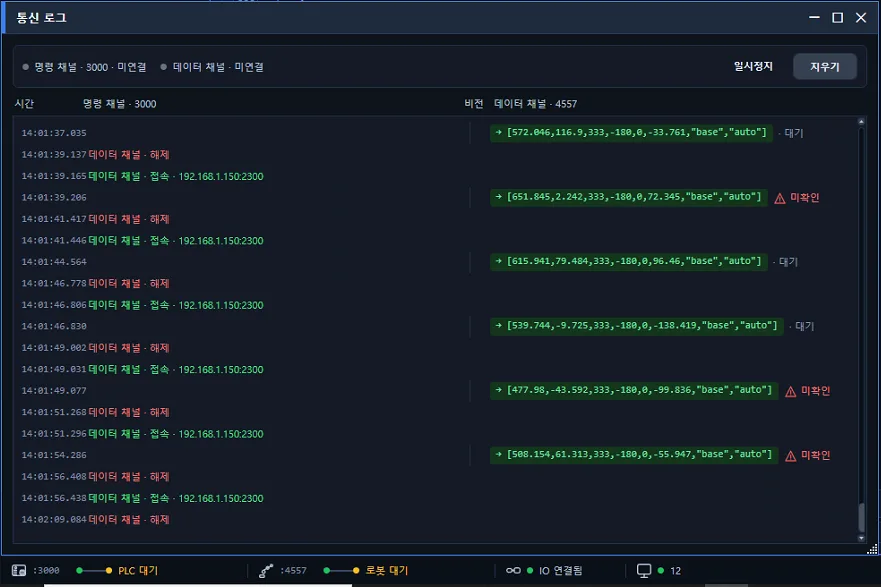
A communication log window shows the traffic with the robot as it happens.
The command channel and the data channel run side by side with timestamps. The coordinates the vision sent are kept as the exact string. The coordinate values and the coordinate system they were sent in sit on the same line, so there is nothing to copy out or reinterpret.
Next to each entry is its handling state. Every line shows whether it is waiting or unconfirmed. Because what was sent and what was confirmed are split apart on screen, you can see at once how far a message got.
Connects and disconnects appear in the same stream. The time a connection dropped and came back is in the log, so you can trace why a pick was missed at a given moment.
Two forms: live and history
The status bar at the bottom of the screen shows the live state of the PLC, the robot, and IO. Whether it is connected right now is on the status bar; what happened a moment ago is in the log.
No external packet analyzer or separate test tool is needed.
Where this matters
- Lines where picks are occasionally missed and the cause has not been isolated
- Sites where the robot and the vision are handled by different companies
- Commissioning, when an integration is being connected for the first time