The first shipped build of AimFactoryCore, 0.1.0.1, went out on July 8. By July 31 we had released 0.1.0.7, seven updates in a single month. Problems found on site and what we changed are written into the release notes as they happen; this post picks out only the changes that reach customer lines directly. Where an item has its own article, the link is attached.
1. One device in front of the PLC — control channels (0.1.0.1)
You choose one of three ways to connect to the upstream PLC: hard-wired DIO, TCP socket commands, or Modbus TCP slave. A cell without a DIO board runs on a single Ethernet cable.
→ No DIO board, one Ethernet cable: the three control channels
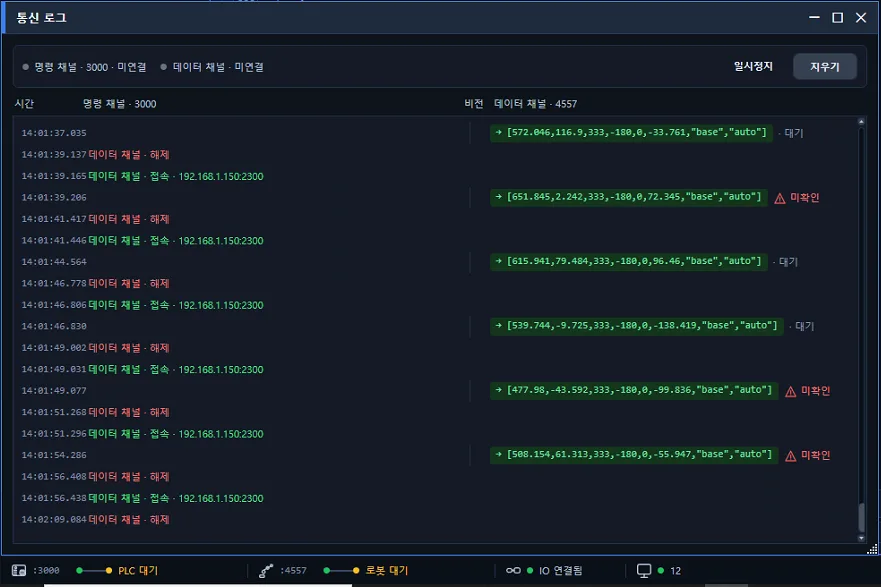
The same build added a communication log window. The values exchanged with the robot are visible inside the software, as they are.
→ See what was sent to the robot, on screen: the communication log window
2. Change the part, and the robot changes first (0.1.0.1, Hyundai Robotics)
The robot program is written to the controller first, and the vision recipe is applied only after verification succeeds. If it fails, the previous recipe stays in place and an alarm is raised.
→ Change the part, and the robot changes first: if verification fails, the previous recipe stays
3. Files survive a power cut mid-save (0.1.0.3)
Recipes and settings are saved atomically, and if corruption is detected the last good copy is restored. Once a day the full recipe set is archived, keeping the latest 30.
→ Recipes survive a power cut in the middle of a save
4. Teach ambiguous candidates on the spot (0.1.0.2, 0.1.0.4)
A gallery re-inspects every saved scene with the current settings in one pass. Results are grouped as pick, no-pick, and undecided. Undecided candidates are confirmed as pick or no-pick in a zoomed preview, and that decision goes straight into training. Wrong picks and misses are flagged with badges.
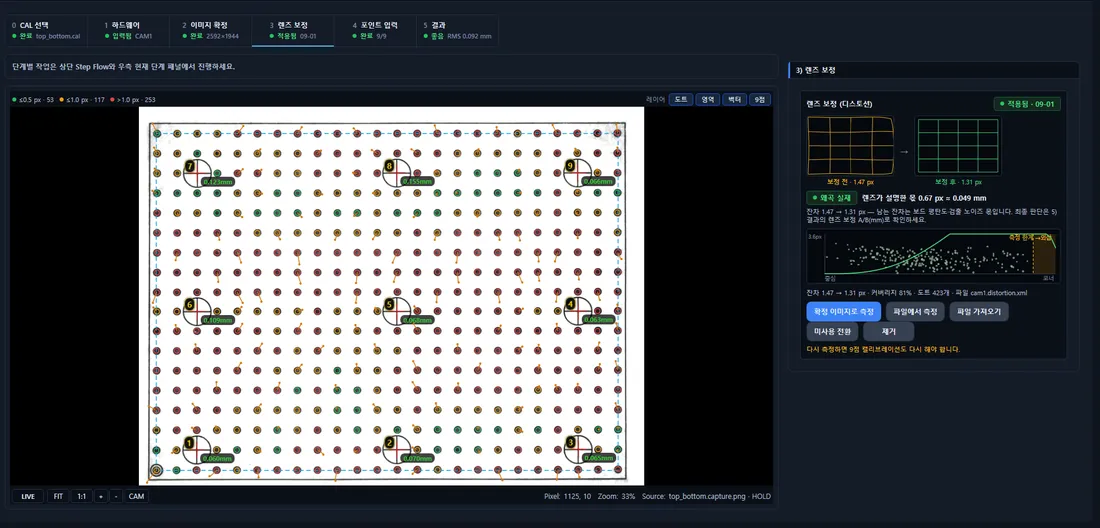
Matching precision improved as well. Angle search is refined to 0.5° steps so result boxes land exactly on the part, and the candidate cap was lifted, fixing scenes with more than 20 parts that used to drop candidates entirely. Search plus verification over the full 2592×1944 frame takes about 0.5 s. Capture and robot transfer time are not included in that figure.
5. Tool calibration from a single rotation (0.1.0.6)
Rotate the robot around one fixed point, and the flange coordinates are circle-fitted to compute the tool center automatically. Points, center, and radius deviation are drawn in ±mm so you can see the precision. A capture button fills the table with the robot’s current coordinates, available for Hyundai Robotics, Agilebot, and IAI.
6. Robot-side changes (0.1.0.5, 0.1.0.7)
Hyundai Hi6 can now be started, stopped, paused, and resumed over Modbus from the screen. Agilebot gained multi-pick transfer of up to 6 picks per capture, PC-screen jogging, and a script editor. Both dedicated integrations are covered in their own posts.
7. English UI and 23 English manuals (0.1.0.7)
Every screen has been translated, and English versions of all 23 HTML manuals ship with the app. Help opens in the display language. The default display language is now English; to keep Korean, choose Korean under Settings → Language and restart. Log files stay in Korean regardless of language so that field reports remain compatible.
Update notes
- Installers are delivered through your AIM engineer. Installing while the app is running closes it automatically.
- Agilebot sites need to update the robot-side BAS program, since 0.1.0.7 changes the handshake contract. Use the editor template or contact your engineer.
- Immediate exit on older CPUs was fixed with a separate build for CPUs without AVX2.
What changed in each version is kept up to date in the AimFactoryCore release notes.